Account Users
As an Organisational administrator or other user with the appropriate permissions, you can create additional account users for your team members, to enable collaboration and co-management of the Sense Defence services.
You can grant different levels of permissions to users, based on the level of visibility and control that is required.
Overview
The Account Users page lists all users who are signed up in that organisation.
Organisational admins can:
- Add and delete users
- Add additional organisational administrator accounts
- Grant granular permissions to users- Admin, Normal or Read only levels
Account user list
To access the Account Users page:
Log in to your Sense Defence account.
On the top menu bar, click Application
On the sidebar, click Administration > Account.
The Account Users page lists the details of all users in the account: Name, Email, Status, Roles and Last login date. You can sort, search, filter the users that are displayed.
Add New User
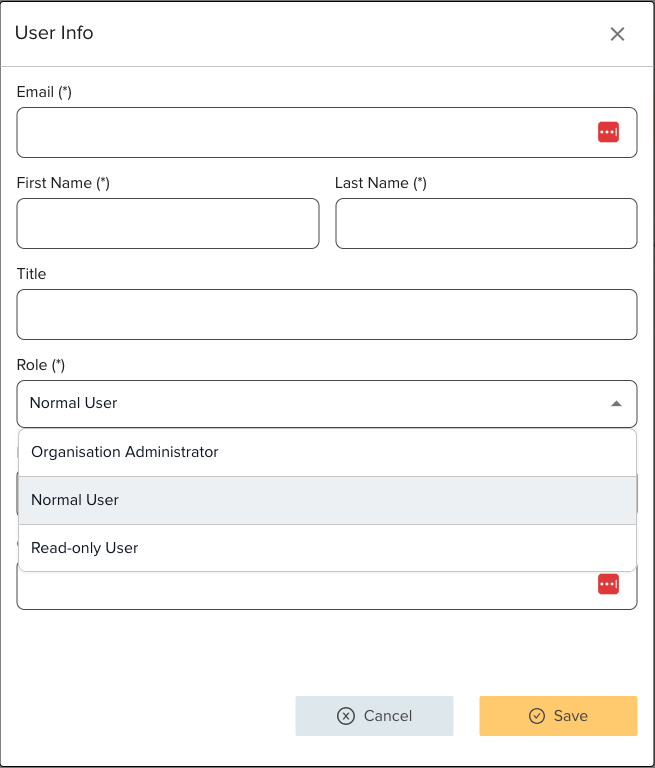
Click Add New User. The organisational administrator or any user with the appropriate permissions can add a new user to the account.
When a new user is created in an account, a verification mail is sent to the email address listed for the user.
The new user clicks the link in the email to verify their address and set a login password.

Email verification is mandatory for login to Sense Defence dashboard. If user is not able to verify email for any reason and still activate the account, organisation administrator can open a ticket in support portal and Sense Defence support would be able to help.
Edit User Details
User should be able to reset his own password using "Forgot Password" link.
However Organisation administrator can reset user credentials from the dashboard. Click on the 'three dots' on the right hand side of the user list and "Edit".
From this screen administrator can update the user details, reset password or change the permissions.
Related Articles
User Preferences
The User Preferences page enables you to update your details, including name, organisation name, and password. Two-factor authentication for your user account is mandatory. You are required to enter a one-time passcode during login, in addition to ...Sense Defence Certificate Management
Overview Sense Defence is an AI-powered Web Application Firewall (WAF) solution that offers robust features for SSL (Secure Sockets Layer) certificate management. Users can opt between generating a free wildcard certificate or uploading their own SSL ...General WAF Configuration
Sense Defence WAF is a layered WAF engine which prioritises and detects malicious attacks in different ways. General Settings In this section, WAF can be enabled/disabled 'globally' or enable/disable WAF engines individually. Customers can choose ...Sense Defence Password Policy
The following password policy applies to users logging in to the Sense Defence Console. Policy Note: This policy does not affect organisations that log in to the Sense Defence Dashboard via their organisation's SSO. Password Strength No more than 2 ...Sense Defence OWASP Core Rule Early Blocking
OWASP released early blocking feature for its core rules sets in Sprint 2022 and Sense defence adapted the changes immediately on its core rules selections. This feature is available for all users - including our community edition customers at free ...